How to Print Your KidzTale Storybook
The KidzTale PDF is an 8.5-inch square book with print bleed, laid out one page at a time. Here is how to print it at home on Letter or A4, keep pictures facing their text, and what to tell a print shop.
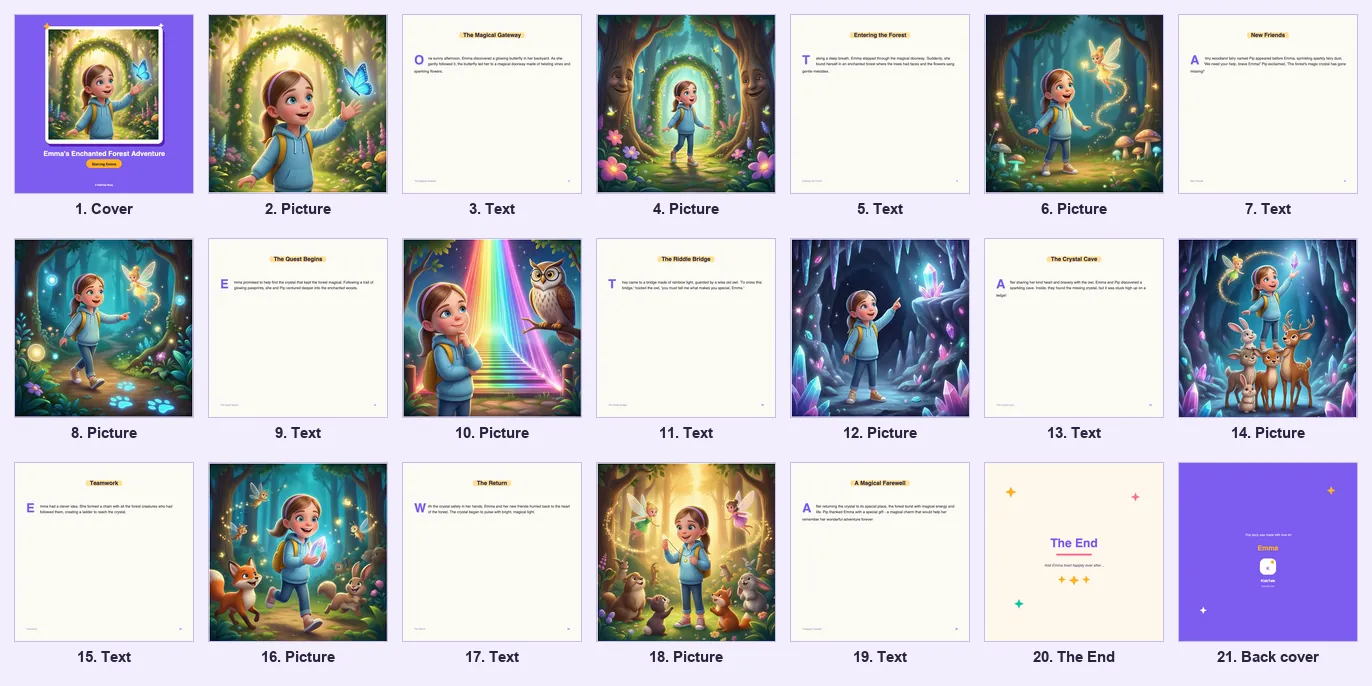
What is inside the KidzTale PDF?
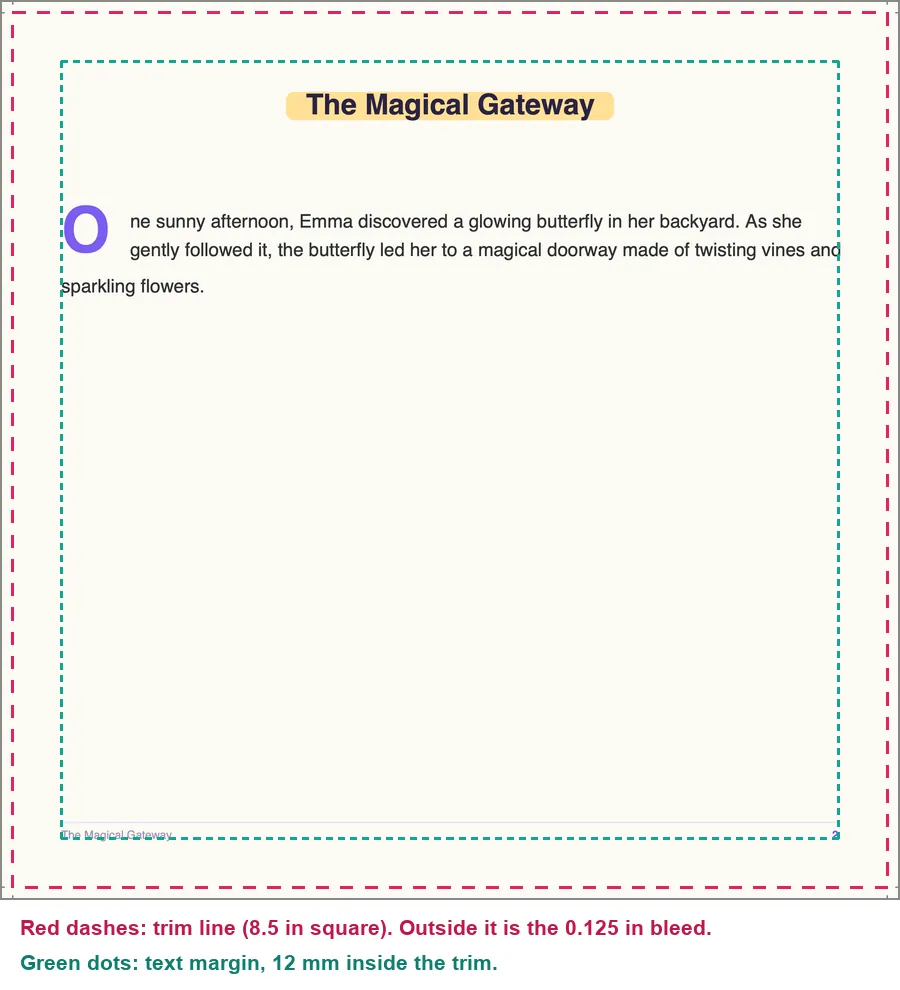
Every page in the PDF is the same size: 8.75 × 8.75 inches (222.25 mm). That is an 8.5 inch square book page plus 0.125 inches of extra picture, called bleed, on each side. The bleed exists for printers that trim the paper after printing, so pictures run to the edge without a white sliver.
A standard 9-page story becomes a 21-page PDF. An extended 16-page story becomes 35 pages. The order never changes:
| PDF page | What is on it |
|---|---|
| 1 | Front cover: the first illustration in a frame, the title and "Starring" your child's name |
| 2 to 19 (2 to 33 for 16 pages) | Pairs of pages: a full-bleed illustration, then the matching text page |
| 20 (34) | "The End" page |
| 21 (35) | Back cover with your child's name and the KidzTale logo |
The PDF holds single pages in reading order. It is not arranged into printer spreads or a fold-and-staple booklet. Narration is not included: audio only plays in the online reader and the iPhone app.
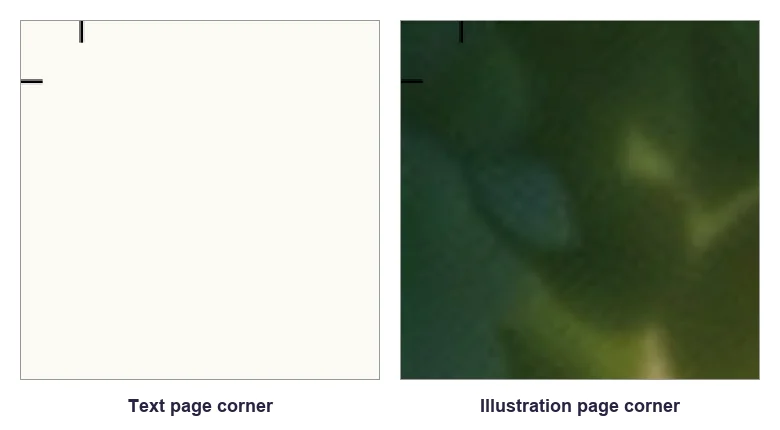
Two details catch people out. The small number at the bottom of each text page is the story's own page number, not the PDF page number. And each corner has short black crop marks. They sit inside the bleed and are removed when a printer trims the page, but they show up if you print at home without trimming.
How do I download the PDF?
Open the story in the online reader and press Download at the top of the screen. On the web the PDF is built in your browser from the story's pictures, which can take a moment. In the iPhone app, use the download button in the reader to save or share the file. You can try the same button on the public demo story before you buy.
The demo PDF we made for this guide is 4.5 MB. Your file size will vary with the pictures.
Which print setting should I use on Letter or A4 paper?
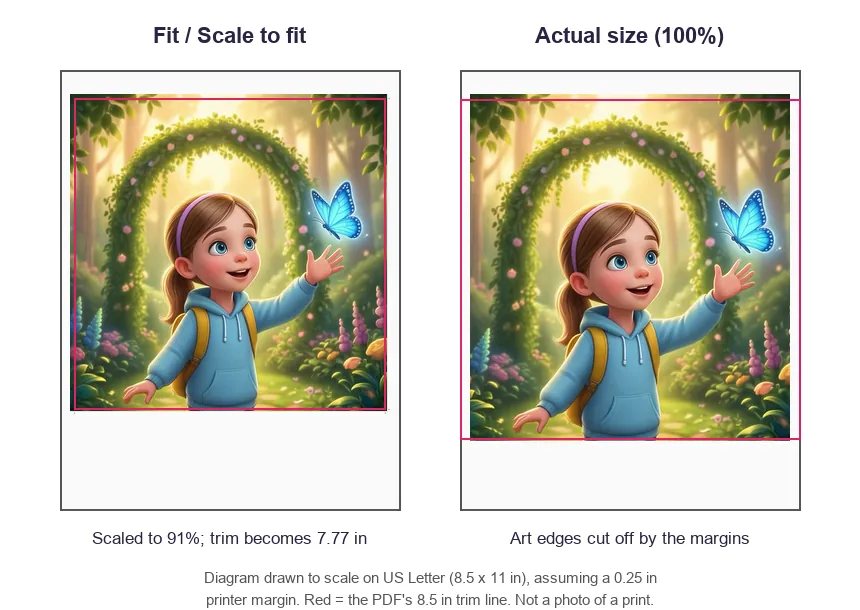
Use Fit (Adobe Acrobat and Reader) or Scale to Fit with Print Entire Image (Preview on Mac). The page is 8.75 inches wide and Letter paper is 8.5 inches wide, so printing at 100% always loses some of the page.
| Paper and setting | Printed book size | What you lose |
|---|---|---|
| Letter, Fit | About 91%: a 7.77 in square book | Nothing; white space below the page |
| A4, Fit | About 89%: a 7.55 in square book | Nothing; white space below the page |
| Letter, Actual size | Full 8.5 in book | About 0.25 in of picture inside each side edge. Text stays on the page with about 0.2 in to spare. |
| A4, Actual size | Full 8.5 in book | About 0.36 in of picture inside each side edge. Text keeps only about 0.1 in (3 mm) to spare. |
These numbers assume your printer leaves a 0.25 inch margin. Many leave more, and then Actual size on A4 can cut into text. If you are not sure, use Fit.
In Preview, avoid Fill Entire Paper. Apple describes it as cropping the image to the proportions of the paper. On a square page that means cutting off the sides.
If you want the full 8.5 inch size at home, you need paper wider than the page plus your printer's margins, such as 11 × 17 in or A3. Print at Actual size, then trim along the crop marks with a paper cutter.
How do I keep each picture facing its text?
Print double-sided in the original order, then staple or bind along the left edge. Because page 1 is the cover, every illustration lands on the back of a sheet and its text lands on the front of the next sheet. When the book is open, the picture is on the left and the text on the right, as in the online reader.
1. Print PDF pages 1 to 20 double-sided. On a Mac, set Double-sided to On, not On (Short Edge). On other systems, choose flip on the long edge.
2. Print page 21 on its own, one side only. Place it at the back with the printed side facing out, so the back cover is on the outside.
3. Check one sheet first. Look at sheet one: the cover should be on the front and the first illustration on the back, the right way up.
4. Bind along the left edge. Staples, a ring binder or a comb binding all work for a home copy.
For an extended story, print pages 1 to 34 double-sided and page 35 on its own.
If your printer cannot print double-sided, print single-sided and glue each picture page to the back of the page before it, either the cover or a text page. It takes longer but gives the same result.
What should I tell a print shop?
Send the PDF unchanged and give the shop these facts. They come from the file itself, and they answer the questions shops usually ask before quoting.
• Trim size: 8.5 × 8.5 in (215.9 mm) square.
• Bleed: 0.125 in (3.175 mm) on every side, so each PDF page is 8.75 × 8.75 in. The file sets only a page size, not separate trim or bleed boxes, so the shop may need to enter the trim size by hand.
• Crop marks: short marks at each corner, inside the bleed. They show where to cut.
• Page count and order: 21 single pages (35 for an extended story) in reading order, with the front cover first and the back cover last. It is an odd number, so ask where they would add blank pages if their binding needs them.
• Pictures: RGB colour. In the demo story each illustration is 1,376 pixels square. Printed full-page at 8.75 in, that is about 157 pixels per inch; the cover picture is smaller on the page, so it is about 255. Ask whether that suits their printer for the size you want.
• Fonts: the text uses standard Helvetica, which the PDF refers to by name rather than embedding. Check the text in a proof.
Ask for one printed proof page before the full run. A proof is the only way to check colour, sharpness and how close the trim comes to the text. Choosing paper, binding and finish is between you and the shop. KidzTale does not recommend particular shop settings.
Common printing problems and fixes
| Problem | Likely cause | What to do |
|---|---|---|
| Edges of the pictures are cut off | Printed at Actual size or Fill Entire Paper on Letter or A4 | Print with Fit, or Scale to Fit and Print Entire Image |
| White border around every picture | Fit scaling plus the printer's unprintable margin | Normal at home. Trim the sheets, or use a print shop that prints to the edge and trims |
| Small black lines in the corners | Crop marks in the bleed | Trim along them, or ignore them on a home copy |
| Pictures do not face their text, or backs are upside down | Single-sided printing gives the wrong pairing; short-edge duplex can turn backs upside down | Print double-sided, flip on the long edge, bind on the left |
| The back cover ends up inside the book | 21 is an odd page count | Print the last page separately and place it facing out |
| A picture page comes out as a plain cream page | That illustration did not load while the PDF was being built | Download the PDF again with a steady connection |
| The download stops with "PDF generation failed" | The browser could not build the file | Try again, or try another browser. If it keeps failing, contact support |
| Colours look duller than on screen | Screens show RGB light; printers mix ink | Expected. A print shop proof shows the real result before you pay for a full run |
Can I print as many copies as I like?
For personal use, yes. The terms of service say the storybooks you generate are yours to keep, print and gift for personal use, and that you can print copies for family or give a printed book as a gift. KidzTale itself does not currently print or ship books, so every printed copy is one you arrange.
What you get before you print
A standard story costs one credit and includes the online reader, recorded narration and this PDF. See what each story includes and prices before you buy, or listen to how the audio narration works in the online reader.
How We Checked This
How we checked this: on 4 November 2026 we generated the public demo story's PDF with the same code the web reader uses, inspected it with qpdf, and rendered every page with macOS PDFKit. Page sizes, page order, margins, fonts and image sizes come from that file and from the generator source. The Letter and A4 figures are calculated, assuming a 0.25 in printer margin. We have not printed this file on a home printer or at a print shop, so paper, colour and real printer margins are untested. Print dialog names come from Apple's and Adobe's help pages. KidzTale publishes this guide and sells the storybooks it describes.
Sources
- Print PDFs and images in Preview on Mac — Apple Support (checked 2026-11-04)
- Print double-sided pages with your Mac — Apple Support (checked 2026-11-04)
- Adjust page size for printing PDFs in Acrobat — Adobe Help Center (checked 2026-11-04)
- KidzTale terms of service: using your storybooks — KidzTale (checked 2026-11-04)
Frequently Asked Questions
What size is a printed KidzTale storybook?
The book page is 8.5 inches square. Each PDF page is 8.75 inches square because it includes 0.125 inches of bleed on every side. With a 0.25-inch printer margin, Fit gives a book about 7.77 inches square on Letter or 7.55 inches on A4. Your printer margins can change that size.
Can I print a KidzTale PDF on A4 paper?
Yes. Use Fit (or Scale to Fit with Print Entire Image). With a 0.25-inch printer margin, the whole page prints at about 89%; your printer margins can change that scale. Actual size can cut off picture edges and, with wider margins, text.
Does KidzTale print and ship the book for me?
No. KidzTale does not currently ship printed books. You can print the PDF at home or take it to a print shop.
Does the PDF include the narration?
No. The PDF holds the pictures and text only. Narration plays in the online reader and the iPhone app.
Can I print the PDF more than once?
Yes, for personal use. The terms of service allow you to print copies for your family and give printed books as gifts.
Ready to Create Your Child's Story?
Make your child the hero of their own personalized adventure. Find your child's name or pick a story theme.
Create a StoryAsad Ali
Founder & Product Lead
AI/ML Engineer & Full-Stack Developer • 10+ years in software and AI product engineering
Asad Ali is the founder and product lead of KidzTale. He is a software and AI/ML engineer who designs how KidzTale turns a parent's details into a personalized story, and he writes the site's guides to choosing and using personalized books.